French grid 3 readings
- Grid carbon intensity
- Renewable share
- Cross-border balance
App for Homey Pro
Run the house when the grid is clean
Available v1.0.4
France's electricity is cleaner at some hours than at others, and the gap can be threefold within a single day. The app reads the grid's carbon intensity and the flows exchanged with neighbouring countries, so that a dishwasher or a car charger can wait for the right moment.
View on the Homey App Store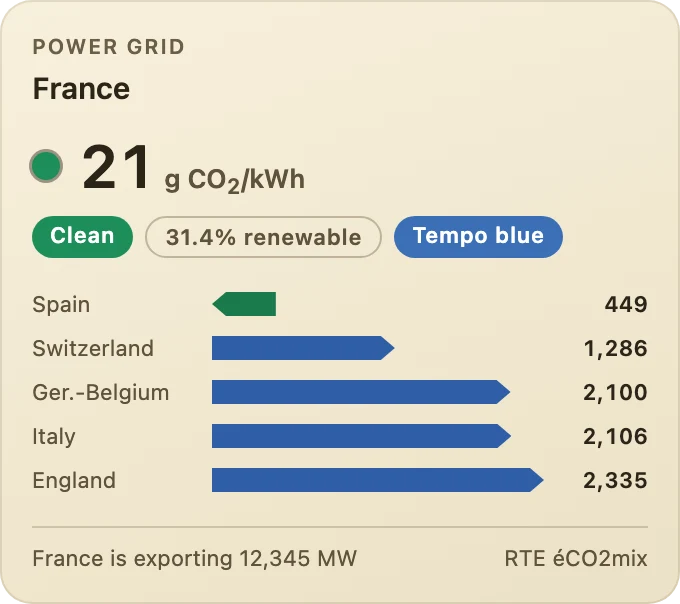
The current carbon intensity, the grid rated clean, average or loaded, the share of renewables and, if you wish, the day's Tempo colour; then the exchanges at each border as bars, and the balance: France importing or exporting.
Homey writes an automation in three parts: when something happens, and if a condition holds, then do this. Anything on a lighter background, such as radius, is a parameter you set in the Flow. Every condition also exists in its negative form, which Homey flips with one click.
When 3
And 4
Then 1
Grid Green Carbon 1.0.4 refreshes its dashboard widget.
As before, small labels under the value say whether the grid is clean, average or loaded right now and give the share of renewables; the exchanges with each neighbouring country are drawn as bars, and the bottom line gives the overall balance (“France is exporting 12,345 MW”).
Edit a dashboard, add a widget and choose Grid Green Carbon, then Grid and flows. In the widget settings, choose what to show (carbon and flows, carbon only or flows only), whether to show the Tempo colour of the day, and a background: deep blue, slate, plum, forest or sand.